Weekly Shorts idea engine: a free n8n workflow
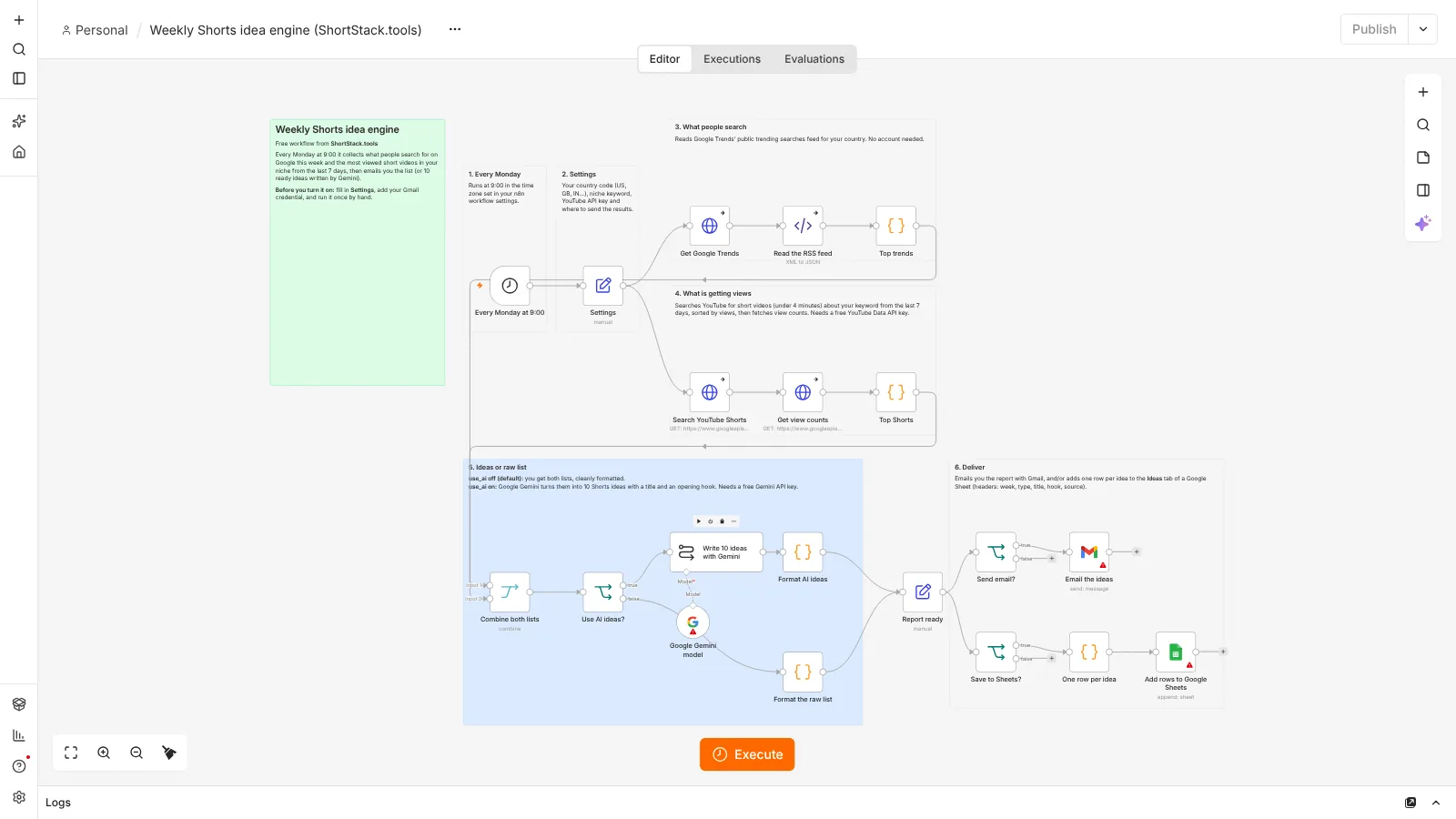
Start each week with ideas instead of a blank page. Every Monday at 9:00, this workflow collects what people are searching for on Google in your country and the most viewed short videos in your niche from the last 7 days, then emails you the list.
What it does
The workflow reads Google Trends' public trending searches feed for the country you choose. At the same time it asks the YouTube Data application programming interface (API) for short videos about your keyword published in the last 7 days, sorted by views, and fetches their view counts. It combines both lists. By default you get them as a clean email. Switch on use_ai and Google Gemini, a large language model (LLM), turns them into 10 Shorts ideas, each with a title and an opening hook. You can also save every row to Google Sheets.
- Every Monday at 9:00Runs on a schedule, no clicks needed
- Read Google TrendsTrending searches for your country
- Search YouTubeShort videos about your keyword from the last 7 days
- Add view countsSorted from most to least viewed
- CombineBoth lists in one place
- Write ideas (optional)Gemini turns them into 10 titles and hooks
- DeliverEmail with Gmail, and rows in Google Sheets if you want
What you need
- n8n: Free to run on your own computer as the Community edition. n8n hosting docs.
- Google Trends: No account needed. The workflow reads its public trending searches feed.
- YouTube Data API key: Free. Create a project in Google Cloud, enable the YouTube Data API v3 and make an API key.
- Gmail: To email you the report. Connected once in n8n with your Google account.
- Google Sheets: Optional. A tab named Ideas with the headers week, type, title, hook and source.
- Gemini: Optional. A free API key from Google AI Studio if you want written ideas.
Set it up in 7 steps
- Run n8n. Install it with Docker using the official n8n guide. This workflow does not need Postiz.
- Import the JSON file. In n8n, open a new workflow, click the three-dot menu and choose Import from File (n8n guide).
- Add your credentials. Connect Gmail (and Google Sheets if you use it) with your Google account (how). Add a Google Gemini credential only if you want written ideas (how).
- Set the top variables. In the Settings node, set your country code (US, GB, IN and so on), your niche keyword, your YouTube API key, your email, and use_ai, send_email and save_to_sheets (true or false).
- Check your time zone. The Monday 9:00 run uses the time zone in the workflow settings, or your n8n default.
- Test it once. Click Execute workflow and check your inbox. If the YouTube list is empty, the email says why, for example an invalid key.
- Activate it. Publish the workflow so it runs every Monday (n8n guide).
Run n8n for free
n8n's Community edition is free to run on your own computer with Docker. Follow the official n8n Docker guide. Your computer needs to be on at 9:00 on Monday for the scheduled run, so some people move n8n to a small server later.
Prefer not to self-host? n8n offers a cloud version with its own pricing (n8n pricing). The workflow file works with either.
Limits
- YouTube Data API quota: Google's docs list a default of 100 search.list calls per day in their own bucket, at 1 unit each, plus 10,000 units per day for other methods. This workflow makes 1 search call and 1 videos call per run. Sources: quota costs and search.list.
- "Short" means under 4 minutes: YouTube's videoDuration=short filter covers videos under 4 minutes, so a few results may not be Shorts (search.list docs).
- Google Trends feed: the trending searches RSS feed (US example) is public but not a documented API, so Google can change it. It returns a short list of recent searches, mostly news and sports.
- Gemini: the free tier has rate limits that Google changes over time. Check the current numbers on the official rate limits page.
Questions
Is this workflow really free?
Yes. The file is free, n8n's Community edition is free to self-host, and Google Trends, the YouTube Data API key, Gmail and the Gemini free tier cost nothing to start. n8n Cloud has its own pricing if you prefer not to self-host.
Do I need Gemini?
No. With use_ai set to false you still get the trending searches and the most viewed short videos in your niche. Gemini only turns them into written ideas.
Can I change the day or time?
Yes. Open the first node, Every Monday at 9:00, and pick another day, hour or interval.
Can I track more than one niche?
Yes. Duplicate the workflow and change niche_keyword in each copy. Each run uses 1 search call from your daily YouTube quota.
Checked against the official n8n, Postiz, Google, Meta and TikTok documentation on October 24, 2026. The workflow was imported and test-run in n8n 2.44. Steps that need your own accounts (Google, Gmail, Gemini) were not run.
Also free: Post once, publish everywhere · Outlier video tracker · Brand-deal inbox sorter · Price-drop watcher for your tool stack · All free workflows