Post once, publish everywhere: a free n8n workflow
Upload a finished vertical video once. This workflow picks it up from Google Drive, writes a caption, sends it to your own Postiz, schedules it on YouTube, TikTok, Instagram or any other channel you have connected, and logs it in a Google Sheet.
What it does
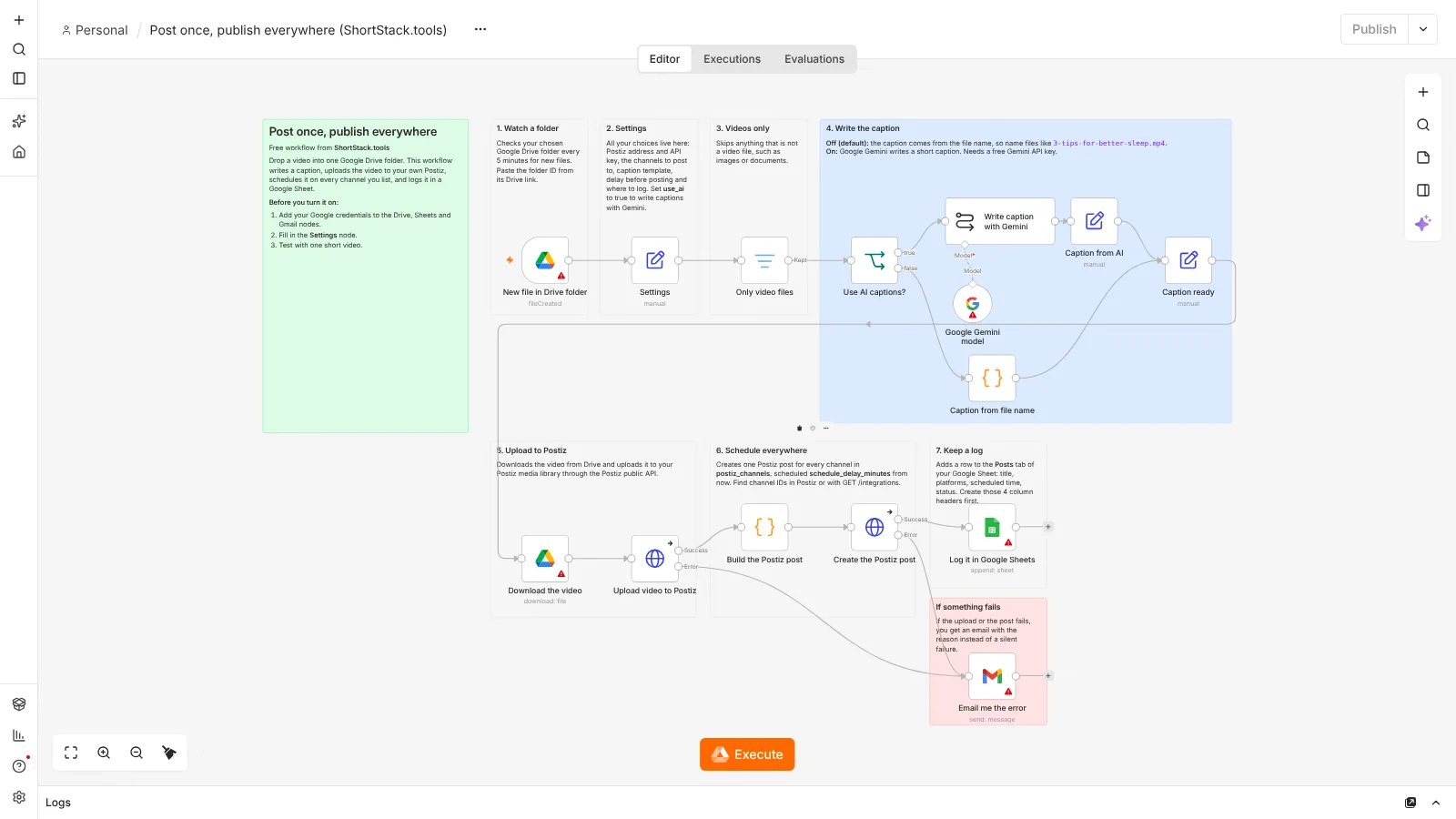
You keep one Google Drive folder for finished videos. Every 5 minutes, n8n checks it for new files. When a video arrives, the workflow builds a caption from the file name (or asks Google Gemini to write one, if you switch that on), uploads the video to Postiz through its public application programming interface (API), and creates one scheduled post for each channel you list. Each post is logged in a Google Sheet, and if the upload or the post fails, you get an email with the reason.
- Watch a Drive folderA new file lands in your chosen Google Drive folder
- Keep videos onlyImages and documents are skipped
- Write the captionFrom the file name, or with Gemini if use_ai is on
- Upload to PostizThe video goes into your Postiz media library
- Schedule everywhereOne post per channel, at the delay you set
- Log itA row in Google Sheets: title, platforms, time, status
- Email on errorsGmail tells you if a video did not go out
What you need
- n8n: Free to run on your own computer as the Community edition. n8n hosting docs.
- Postiz: Open source, self-hosted, with your social channels connected. You need its API key from Settings, Developers.
- Google Drive: A folder for finished videos. The Google Drive, Google Sheets and Gmail nodes all use the same Google account, connected once in n8n.
- Google Sheets: A sheet with a tab named Posts and the column headers title, platforms, scheduled_time and status.
- Gmail: Used only to email you when something fails.
- Gemini: Optional. A free API key from Google AI Studio if you want AI captions.
Set it up in 7 steps
- Run n8n and Postiz. Install both with Docker, following the official guides for n8n and Postiz.
- Import the JSON file. In n8n, open a new workflow, click the three-dot menu and choose Import from File (n8n guide).
- Add your credentials. Connect your Google account to the Drive, Sheets and Gmail nodes (how). Add a Google Gemini credential only if you plan to use AI captions (how).
- Set the top variables. Open the Settings node and fill in your Postiz address and API key, the sheet ID, your email, the delay before posting and use_ai (true or false). Paste your Drive folder ID into the first node.
- Connect your Postiz channels. Add YouTube, TikTok, Instagram or others in Postiz. Self-hosted Postiz needs a developer app for most platforms (Postiz guide). Copy each channel ID into postiz_channels with its platform name, for example youtube, tiktok or instagram.
- Test with one video. Click Execute workflow, drop one short video into the folder and check that it appears in your Postiz calendar and your sheet.
- Activate it. Publish the workflow so it keeps running on its own (n8n guide).
Run n8n and Postiz for free
Both n8n and Postiz can run on your own computer with Docker, at no cost. Follow the official guides: install n8n with Docker and install Postiz with Docker Compose. Your computer has to be on for the workflow to run. Platforms like TikTok and Instagram also need to reach your video files over the internet, so many people move both tools to a small server once everything works.
Prefer not to self-host? n8n and Postiz both offer cloud versions with their own pricing: n8n pricing and Postiz Cloud plans. The workflow file works with either.
Limits
- TikTok: self-hosted Postiz needs your own TikTok developer app. Until TikTok audits that app, posts are forced to private (SELF_ONLY), and TikTok fetches the video from a public HTTPS address, so local-only uploads fail. Source: Postiz TikTok setup and TikTok content sharing guidelines.
- Instagram: publishing through the API works with Instagram Business or Creator accounts, per Meta's Instagram Platform docs. Postiz's standalone Instagram option needs a professional account (Postiz Instagram setup).
- Postiz API: the create post endpoint is rate limited per hour (self-hosters can change it with API_LIMIT). The workflow sends one request per video for all channels. Source: Postiz API overview.
- Gemini: the free tier has rate limits that Google changes over time. Check the current numbers on the official rate limits page.
- Google Drive: the trigger checks the folder every 5 minutes, so posts are not instant. Name files clearly, because the default caption comes from the file name.
Questions
Is this workflow really free?
Yes. The workflow file is free, n8n's Community edition and Postiz are free to self-host, and the Google tools it uses have free accounts. If you choose n8n Cloud or Postiz Cloud instead, those have their own pricing.
Does it post to TikTok publicly?
Only after your TikTok developer app passes TikTok's audit. Before that, TikTok forces posts made through its API to private, according to Postiz's TikTok setup guide.
Do I need to know how to code?
No. You fill in a Settings node and connect accounts. The caption and post steps are already written. You only edit code if you want to change how captions are built.
Can I post to only one or two platforms?
Yes. List only the channels you want in postiz_channels. The workflow creates one post per channel in that list.
Checked against the official n8n, Postiz, Google, Meta and TikTok documentation on October 24, 2026. The workflow was imported and test-run in n8n 2.44. Steps that need your own accounts (Google, Gmail, Gemini) were not run.
Also free: Weekly Shorts idea engine · Outlier video tracker · Brand-deal inbox sorter · Price-drop watcher for your tool stack · All free workflows