Price-drop watcher for your tool stack: a free n8n workflow
Know when the tools you pay for change their price. Every Monday, this workflow reads ShortStack's public tool data, checks the tools you list and emails you when a price or free plan changes.
What it does
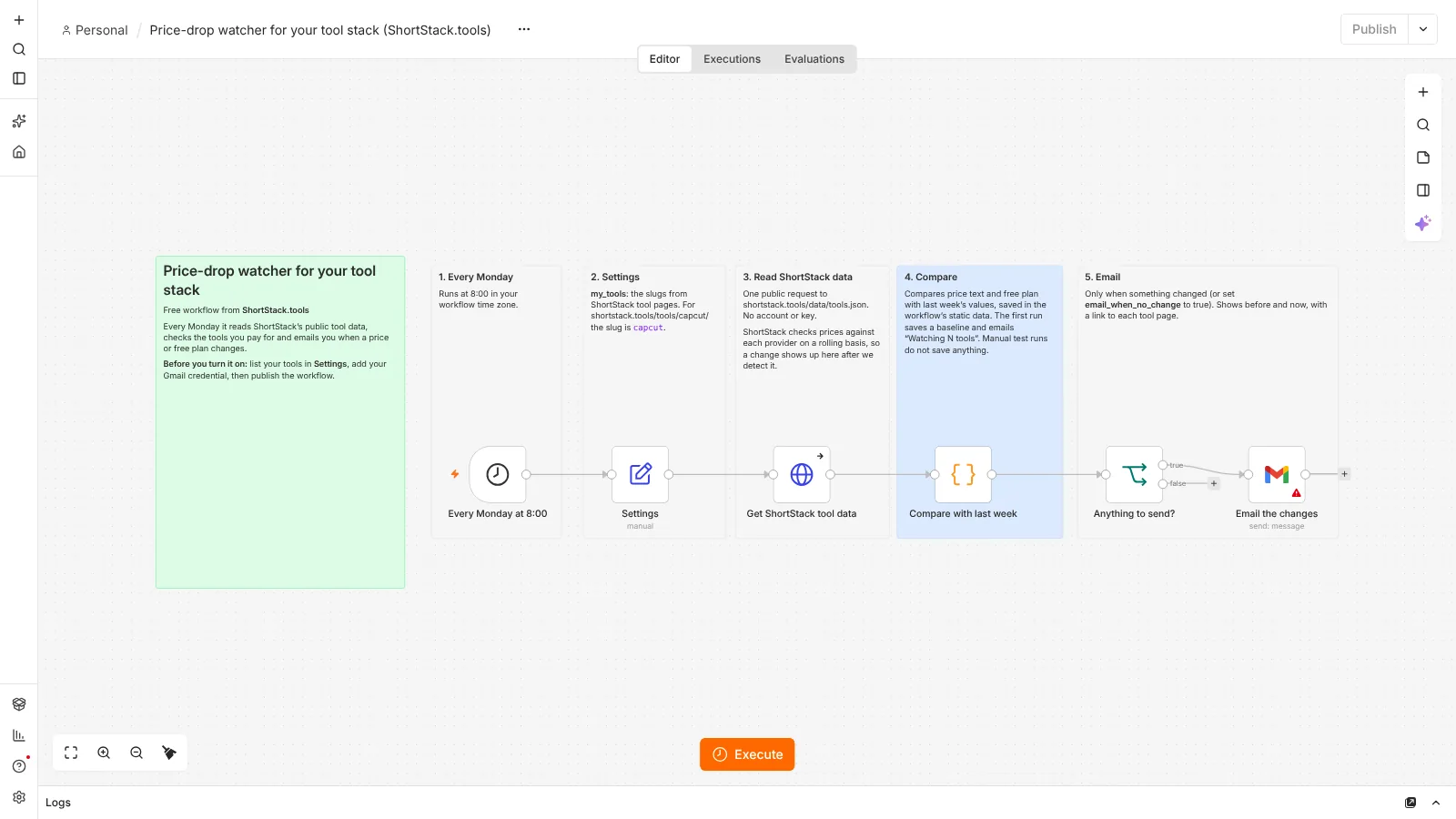
You list the ShortStack slugs of the tools you use, such as capcut or canva. Every Monday at 8:00 the workflow downloads ShortStack's public tool data file, which needs no account or key, and picks out your tools. It compares each price and free plan with last week's values, which n8n keeps in the workflow's own static data. If anything changed, you get one email with the old and new value and a link to each tool page. The first run saves a baseline and emails you "Watching N tools". Weeks with no change send nothing, unless you ask for a weekly email anyway.
- Every Monday at 8:00Runs on a schedule, no clicks needed
- Your tool listSlugs from ShortStack tool pages
- Read ShortStack dataOne public request, no key
- ComparePrice and free plan against last week
- RememberSaves this week's values in the workflow
- Email changesBefore and after, with links
Use it with the stack cost calculator to see what a change does to your monthly total, or try the stack finder to look for a cheaper set of tools.
What you need
- n8n: Free to run on your own computer as the Community edition. n8n hosting docs.
- Gmail: To email you. Connected once in n8n with your Google account. On self-hosted n8n this needs your own Google OAuth client (see below).
- Your tool list: The slug is the last part of a tool page address: shortstack.tools/tools/capcut/ has the slug capcut.
Set it up in 6 steps
- Run n8n. Install it with Docker using the official n8n guide.
- Import the JSON file. In n8n, open a new workflow, click the three-dot menu and choose Import from File (n8n guide).
- Connect Gmail. Add your Google credential to the Gmail node. On self-hosted n8n this needs your own Google OAuth client (n8n guide).
- List your tools. In the Settings node, set my_tools, for example ["capcut", "canva", "elevenlabs"], and email_to. Set email_when_no_change to true if you want an email every week.
- Test it once. Click Execute workflow. You see the "Watching N tools" email, but nothing is saved yet: n8n only keeps static data for runs started by a trigger after the workflow is published (n8n docs).
- Activate it. Publish the workflow (n8n guide). The first scheduled run saves the baseline and emails you the list. Later runs email you only when something changes.
Run n8n for free
n8n's Community edition is free to run on your own computer with Docker. Follow the official n8n Docker guide. Your computer needs to be on when the workflow is due to run, so some people move n8n to a small server later.
Prefer not to self-host? n8n offers a cloud version with its own pricing (n8n pricing). The workflow file works with either.
Google sign-in on self-hosted n8n: the one-click "Sign in with Google" option is only for n8n Cloud. On self-hosted n8n you create your own Open Authorization (OAuth) client in Google Cloud: make a project, enable the Gmail API (and the Google Sheets API if you log to a sheet), set up the consent screen, create a web application client and paste n8n's redirect address into it. n8n's guide walks through each screen: Google OAuth2 for n8n.
Limits
- Changes show up after ShortStack detects them: we check prices against each provider on a rolling basis (how we check prices), so the email can come some time after a provider changes its price. Confirm on the provider's own pricing page before you change plans.
- Price text, not numbers: the workflow compares the price as written on ShortStack, so a wording fix with the same price also counts as a change.
- Saved values: n8n saves static data only when a run started by a trigger succeeds (n8n docs). If a run fails, for example because Gmail is not connected, the next run compares with the last good one. Importing the file again starts a new baseline.
- Weekly checks: a price that changes and changes back within the same week is not reported.
Questions
Is this workflow really free?
Yes. The file is free, ShortStack's tool data is public, n8n's Community edition is free to self-host and Gmail costs nothing.
Where do the prices come from?
From ShortStack's public tool data, the same prices you see on each tool page. We check them against each provider on a rolling basis, so the workflow reports a change after we detect it.
Does it check the providers' own websites?
No. It reads ShortStack's data file only, so it does not scrape provider websites or need accounts with them.
Why did my test run not save anything?
n8n only saves workflow static data on runs started by a trigger after the workflow is published. Manual test runs show the email but start fresh every time.
Checked against the official n8n documentation on October 24, 2026. The workflow was imported and test-run in n8n 2.44 against the live ShortStack data file, including a baseline saved across two published runs and a detected price change. The Gmail step was not run.
Also free: Post once, publish everywhere · Weekly Shorts idea engine · Outlier video tracker · Brand-deal inbox sorter · All free workflows