Outlier video tracker: a free n8n workflow
Find the videos that broke out. Every Monday at 9:00, this workflow checks the YouTube channels you list and emails you any new video that got far more views than that channel usually gets.
What it does
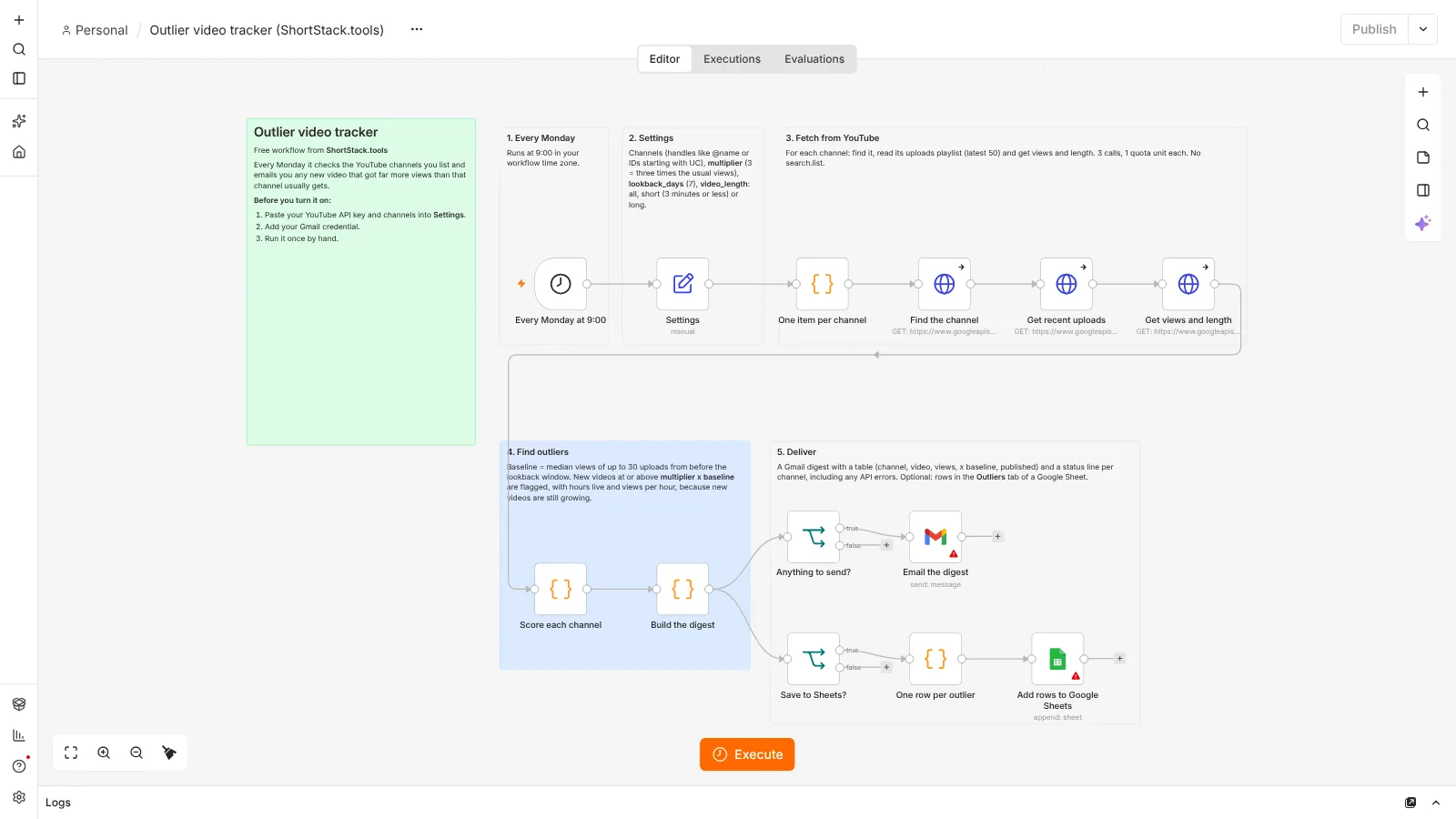
You list YouTube channels by handle (like @name) or by channel ID. For each one, the workflow uses the YouTube Data application programming interface (API) to find the channel, read its uploads playlist (the latest 50 uploads) and fetch the views and length of each video. The baseline is the median views of up to 30 uploads from before the lookback window, so one viral video does not skew it. Any video from the last 7 days with at least 3 times the baseline views is flagged. New videos are still collecting views, so the email also shows how many hours each one has been live and its views per hour. You get one Gmail digest with a table and a status line for every channel, including channels with no new videos and channels that returned an error. You can also save each outlier to Google Sheets.
- Every Monday at 9:00Runs on a schedule, no clicks needed
- Read your settingsChannels, multiplier, lookback days, email
- Find each channelFrom a handle or a channel ID
- Read recent uploadsThe latest 50 from the uploads playlist
- Get views and lengthOne call covers up to 50 videos
- Find outliersNew videos at 3 times the median or more
- DeliverGmail digest, and rows in Google Sheets if you want
How it compares to paid outlier tools
Paid tools like 1of10 and ViewStats do a similar core job: they point out videos that beat a channel's usual views. They do much more than this workflow. This is a free, basic version that only checks the channels you list, once a week.
What you need
- n8n: Free to run on your own computer as the Community edition. n8n hosting docs.
- YouTube Data API key: Free. Create a project in Google Cloud, enable the YouTube Data API v3 and make an API key (Google guide).
- Gmail: To email you the digest. Connected once in n8n with your Google account.
- Google Sheets: Optional. A tab named Outliers with the headers week, channel, title, link, views, times_baseline, published, hours_since and views_per_hour.
Set it up in 7 steps
- Run n8n. Install it with Docker using the official n8n guide.
- Import the JSON file. In n8n, open a new workflow, click the three-dot menu and choose Import from File (n8n guide).
- Make a YouTube API key. In Google Cloud, create a project, enable the YouTube Data API v3 and create an API key (Google guide).
- Connect Gmail. Add your Google credential to the Gmail node (and Google Sheets if you use it). On self-hosted n8n this needs your own Google OAuth client (n8n guide).
- Set the top variables. In the Settings node, paste your API key and list your channels, for example ["@channelname", "UC..."]. Adjust multiplier (default 3), lookback_days (default 7), baseline_videos (default 30) and video_length (all, short for 3 minutes or less, or long). Set email_to, and save_to_sheets if you want rows.
- Test it once. Click Execute workflow and check your inbox. The email lists every channel it checked. A wrong handle or key shows up there as an error instead of stopping the run.
- Activate it. Publish the workflow so it runs every Monday (n8n guide).
Run n8n for free
n8n's Community edition is free to run on your own computer with Docker. Follow the official n8n Docker guide. Your computer needs to be on when the workflow is due to run, so some people move n8n to a small server later.
Prefer not to self-host? n8n offers a cloud version with its own pricing (n8n pricing). The workflow file works with either.
Google sign-in on self-hosted n8n: the one-click "Sign in with Google" option is only for n8n Cloud. On self-hosted n8n you create your own Open Authorization (OAuth) client in Google Cloud: make a project, enable the Gmail API (and the Google Sheets API if you log to a sheet), set up the consent screen, create a web application client and paste n8n's redirect address into it. n8n's guide walks through each screen: Google OAuth2 for n8n.
Limits
- YouTube Data API quota: channels.list, playlistItems.list and videos.list each cost 1 unit per call, and projects get 10,000 units per day by default. The workflow makes 3 calls per channel per run, so 20 channels use about 60 units a week. It does not use search.list. Sources: quota costs, channels.list, playlistItems.list and videos.list.
- Latest 50 uploads: playlistItems.list returns at most 50 items per call (Google docs), and the workflow reads one page. A channel that posts more than 20 videos inside the lookback window leaves fewer than 30 older uploads for the baseline. If there are no older uploads at all, the baseline uses every upload it fetched.
- New videos are young: a video posted yesterday has had less time than the older videos in the baseline, so the flag is cautious. Look at hours live and views per hour before you draw conclusions.
- Shorts and long videos mix: the uploads playlist holds every upload. Set video_length to short (3 minutes or less) or long to compare like with like. The workflow sorts by length, not by whether YouTube counts a video as a Short. Live and upcoming streams are skipped.
Questions
Is this workflow really free?
Yes. The file is free, n8n's Community edition is free to self-host, and a YouTube Data API key and Gmail cost nothing. At 3 quota units per channel per run, a weekly check stays far below the default 10,000 units per day.
How is this different from 1of10 or ViewStats?
Those paid tools do a similar core job and much more. This workflow is a free, basic version: it only checks the channels you list, once a week, and compares each new video with that channel's own median views.
Why the median and not the average?
One viral video can pull the average far up. The median is the middle value, so a single hit or flop barely moves it, which makes real outliers easier to spot.
Can I track channels that are not mine?
Yes. The workflow only reads public data: channel details, the public uploads list and public view counts. You do not need access to the channels you track.
Checked against the official n8n and YouTube Data API documentation on October 24, 2026. The workflow was imported and test-run in n8n 2.44: the outlier math ran on sample channel data, and a run against the real YouTube API with a placeholder key put the error in the digest as planned. Steps that need your own accounts (a working YouTube API key, Gmail, Google Sheets) were not run.
Also free: Post once, publish everywhere · Weekly Shorts idea engine · Brand-deal inbox sorter · Price-drop watcher for your tool stack · All free workflows