
Burncaps pricing, free plan and alternatives
AI clippingPricing · checked November 6, 2026
Free
Paid plans from $9.98/mo
Browser AI clipper and caption tool: finds the best moments of a long talk or podcast and gives back ranked, captioned 9:16 clips; the video stays on your device.
Our hands-on test
Verdict
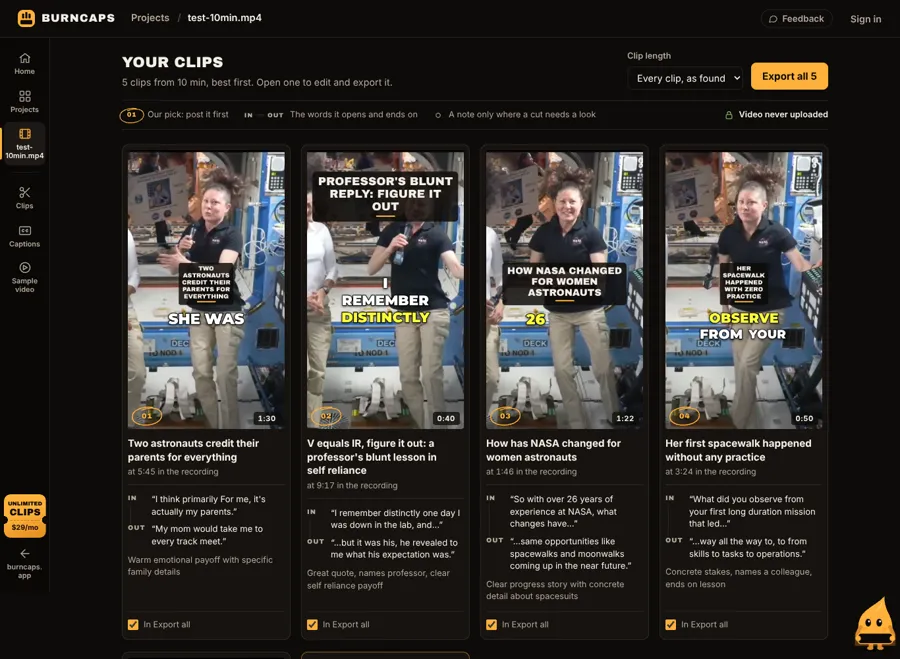
Burncaps found 5 clips in our 10-minute test video and exported 3 of them free at 1080x1920 with captions and no watermark, with no account.
- Free plan
- 2 videos every 30 days, up to 3 clips each
- Time to clips
- About 17 min on our test computer (no GPU)
- Free export
- 1080x1920, no watermark
- Account needed
- No
Good
- 3 free clip exports with no watermark and no account
- Each clip shows the words it opens and ends on, plus a reason
- Video stays in the browser; only sound or text goes out when you choose it
Watch out
- Only 3 of the 5 clips found export free; the 4th opened a Pro trial offer
- On a computer without a GPU, on-device listening estimated 65 minutes for 10 minutes of video
- Clip finding sends the transcript text to their AI
All test results
What we did: We opened burncaps.app in Google Chrome with no account, chose Clips from a long video and picked a 10-minute public-domain NASA video (two astronauts answering questions, 1280x720, 30 fps, 44.5 MB). We kept the defaults (Clips, captions as spoken, default style). Our test computer has no GPU, so the in-browser speech model ran on a software GPU.
| Account needed | No. No email or sign-up was asked for at any step |
|---|---|
| Speech model | A 291 MB model downloaded once in the browser (Whisper base). After about 15 minutes it had heard 48 seconds and estimated 65 minutes left, then offered their speech service. We chose it; the page then made a series of requests to its speech service, and the transcript was ready within about 30 seconds |
| Time | About 17 minutes from choosing the file to the clip list, including the model download; 77 seconds after switching to the speech service |
| Clips found | 5, ranked, each with a title, the words it opens and ends on, and a reason |
| Clip length | 40 to 90 seconds (1:30, 0:40, 1:22, 0:50, 0:42) |
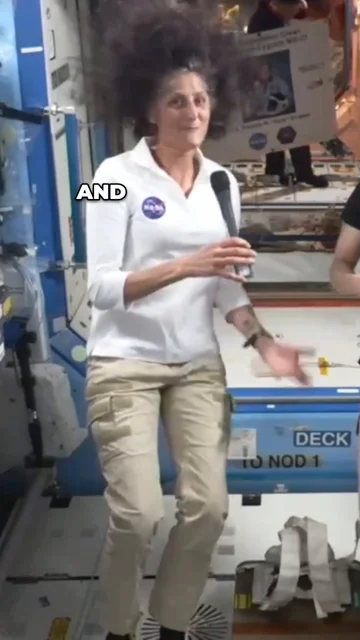
| Export on the free plan | 1080x1920 at 30 fps, H.264 video with Opus audio in MP4, captions burned in; about 5.6 Mbps (63 MB for 90 s) |
| Export time | Done in the browser: about 2.5 to 9.5 minutes per clip on our test computer |
| Framing | Cropped to 9:16 on the speaker; clip 4 used a split screen with both astronauts. The 720p source was scaled up to 1080x1920 |
| Watermark | None in the frames we checked, including the last frame of each clip |
| Free-plan limit | The 4th clip opened "Try Pro free for 7 days. No card." The page then said "One free video left in these 30 days" |
| What leaves the device | The page says only the transcript text goes to their AI for clip finding. The speech service, when chosen, gets the sound only |
Full verdict: Burncaps did what its free tier promises in our test: no account, 3 clips exported with captions at 1080x1920 and no watermark. It found 5 clips in a 10-minute video, so 2 needed Pro. The video stays in the browser, but on a computer without a GPU the on-device listening is slow, and the fast option sends the sound to their speech service.
The short version
Burncaps is a browser tool that finds the best moments of a long talk, podcast or interview and gives them back as ranked 9:16 clips with word-by-word captions burned in, or captions a whole video. The video opens in the page and is not uploaded. The free plan gives 2 videos every 30 days, each with captions and up to 3 clips, with no watermark and no sign-up. Pro, for unlimited clips, is $29 a month or $14.50 a month billed yearly; Starter, for captioned videos only, is $9.98 a month or $49 once.
Best for: Podcasters and interviewers who want ranked clips from long recordings · Creators who want watermark-free clips without making an account · People who prefer their video to stay on their own device
Plans and pricing
2 videos every 30 days, each with captions and up to 3 clips; no watermark, no card, no sign-up
Unlimited captioned videos, logo and brand presets, translations into 59 languages; no clip exports
Unlimited clips from recordings up to three hours; 7-day free trial, no card
What it does well
- Free clips export at 1080x1920 with no watermark and no account
- In our 60-second caption test it got 115 of 118 words right
- Each clip shows the words it opens and ends on, plus why it was picked
- The video itself is processed in the browser and not uploaded
- Starter can be bought once for $49 instead of a subscription
Limitations
- Free gives 3 clips per video; the rest need Pro
- Clip exports are not part of Starter
- On a computer without a graphics card, on-device listening is slow; the faster option sends the sound to their speech service
- Clip finding sends the transcript text to their AI
Alternatives to consider




Plans and prices checked on from: burncaps.app · burncaps.app. Prices change, so confirm on the provider’s site.
Where it fits in your workflow
Turn podcasts, webinars and long recordings into short-form clips. Compare captioning, reframing and free-plan options.
Burncaps is listed for Instagram Reels, TikTok, YouTube Shorts. Compare its features and plan limits with your production needs before committing.
What to check before choosing
- Current pricing, billing period and cancellation options.
- Usage limits, watermarks, export quality and supported formats.
- Commercial-use rights, account permissions and how your data is handled.
- Whether the workflow works on your device and with your existing tools.
Add the ShortStack badge to your site
Paste this on your site to show Burncaps is listed on ShortStack. It links to this page, where creators compare your real prices.

<a href="https://shortstack.tools/tools/burncaps/?ref=badge" target="_blank" rel="noopener"><img src="https://shortstack.tools/badge/featured-light.svg" alt="Featured on ShortStack" width="220" height="56"></a>
<a href="https://shortstack.tools/tools/burncaps/?ref=badge" target="_blank" rel="noopener"><img src="https://shortstack.tools/badge/featured-dark.svg" alt="Featured on ShortStack" width="220" height="56"></a>Need React, Markdown, a website builder or an AI agent prompt? Get every format →
Questions about Burncaps
Is Burncaps free?
Yes. The free plan gives 2 videos every 30 days, each with captions and up to 3 clips, with no watermark and no sign-up. Pro costs $29 a month or $14.50 a month billed yearly.
Does Burncaps upload my video?
The video is processed in your browser and not uploaded. The sound goes to their speech service only if you choose that option, and clip finding sends the transcript text to their AI.
How much does Burncaps cost?
Paid plans start at $9.98/mo (Starter). Prices change, so confirm on the provider’s site.
Catalog snapshot: . The 'Our hands-on test' section is from our own test; the rest summarizes the provider's published information. Suggest a correction →