
Gling pricing, free plan and alternatives
Video editingPricing · checked November 23, 2026
Free
Paid plans from $10/mo billed yearly
We tested it on Oct 28, 2026: Gling cut the dead air and filler from our clip in about a minute and kept every spoken word, but free MP4s carry a watermark. See the test
AI editor that removes silences and bad takes and offers title, idea and clip tools.
Is Gling free? What the free plan includes
Does Gling have a watermark?
Yes, free exports are watermarked.
“However, in the free version your exported videos will include a watermark” Source ↗
Quoted from Gling's own pages, captured on . Plans change, so confirm on their site before you pay.
Our hands-on test
Verdict
Gling cut the dead air and filler from our clip in about a minute and kept every spoken word, but free MP4s carry a watermark.
- Time to edit
- About 1 minute
- Clip length
- 60 s to 35.8 s
- Free export
- 1280x720, watermark
- Account needed
- Email and password
Good
- Kept all 118 spoken words
- Removed the silent start and an uh
- No card or payment asked for
Watch out
- Made with gling watermark on free MP4s
- 2 wrong words in the transcript
- Email check needed before the first edit
All test results
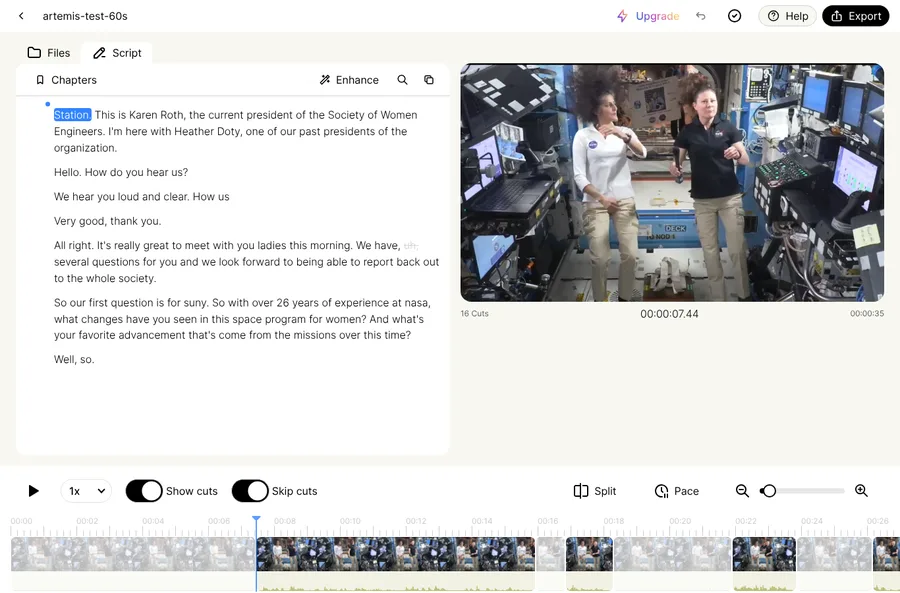
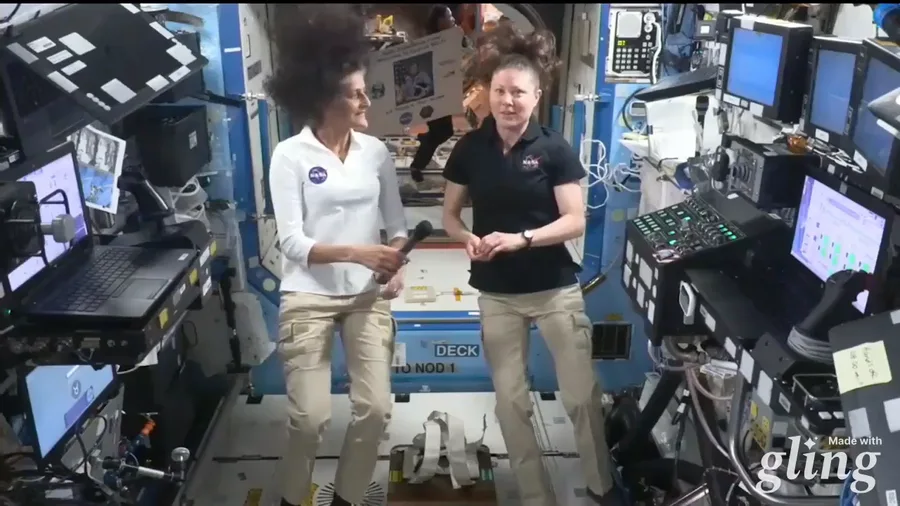
What we did: We made a free Gling account with an email and password, opened the browser editor, chose Edit with AI, added a 60-second clip from a public-domain NASA video (two people on the space station talking, 1280x720, the first 6 seconds silent), kept the default Cut silences, Cut bad takes and Remove filler words, and exported the MP4.
| Account needed | Yes: email and password, then a link in a verification email before the first edit. Google sign-in also offered |
|---|---|
| Time | About 1 minute from "Enhance and edit" to the finished edit; the export took under a minute |
| Edit | 16 cuts; 60 s became 35.8 s, including the 6 silent seconds at the start and one "uh" |
| Speech kept | All 118 spoken words were still in the export (we checked with a separate transcript) |
| Transcript | 2 wrong words: "suny" for Suni and "this space program" for "the space program" |
| Output | MP4, 1280x720 at 30 fps, 35.8 s, 19.1 MB |
| Watermark | Yes, "Made with gling" in the bottom right corner |
| Card or payment asked | No |
Full verdict: Gling did what it promises: it removed the dead air and filler from our clip in about a minute and kept every spoken word. The free plan is fine for trying it, but MP4s carry a watermark; Plus at $10/mo billed yearly removes it.
The short version
Gling is a browser and desktop editor for talking-head YouTube videos. It transcribes your recording, then cuts silences, bad takes and filler words for you, and can add captions, zooms and YouTube titles and chapters. The free plan gives 1 hour of AI editing a month, and MP4 exports carry a "Made with gling" watermark. Paid plans start at $10/mo billed yearly (Plus) and remove the watermark.
Best for: Cutting silences and filler words out of a talking-head recording · Turning a raw take into a tighter rough cut, then finishing it in Premiere, Final Cut, Resolve or CapCut on a paid plan · YouTubers who edit by reading the transcript instead of scrubbing a timeline
Plans and pricing
1 hour of AI-edited media a month, unlimited MP4 exports with a watermark, MP3 export; no card needed
10 hours of AI-edited media a month (or 300 words of video generated from a link), no watermark
30 hours a month (or 900 generated words), premium support
100 hours a month (or 2,700 generated words), premium support
What it does well
- Cut our 60-second clip to 36 seconds in about a minute without losing a single spoken word
- Edits are shown in the transcript, so you can see each removed filler word and undo it
- Exports MP4, WAV and SRT files and a Shorts option; paid plans add project files for Premiere, Final Cut and Resolve
- Works in the browser on the file on your computer; there is also a Windows and Mac app
Limitations
- Free MP4 exports carry a "Made with gling" watermark in the bottom right
- Free plan covers 1 hour of media a month
- Transcript spelled the name Suni as "suny" and wrote NASA in lower case
- Gling's FAQ says the free plan can't export to Premiere, Final Cut or Resolve
Alternatives to consider



Plans and prices checked on from: gling.ai · app.gling.ai. Prices change, so confirm on the provider’s site.
Add the ShortStack.tools badge to your site
Paste this on your site to show Gling is listed on ShortStack.tools. It links to this page, where creators compare your real prices.

<a href="https://shortstack.tools/tools/gling/?ref=badge" target="_blank" rel="noopener"><img src="https://shortstack.tools/badge/featured-light.svg" alt="Featured on ShortStack.tools" width="220" height="56"></a>
<a href="https://shortstack.tools/tools/gling/?ref=badge" target="_blank" rel="noopener"><img src="https://shortstack.tools/badge/featured-dark.svg" alt="Featured on ShortStack.tools" width="220" height="56"></a>Need React, Markdown, a website builder or an AI agent prompt? Get every format →
Questions about Gling
How much does Gling cost?
Paid plans start at $10/mo billed yearly (Plus). Prices change, so confirm on the provider’s site.
Catalog snapshot: . The 'Our hands-on test' section is from our own test; the rest summarizes the provider's published information. Suggest a correction →