ZapCap pricing, free plan and alternatives
AI clippingPricing · checked October 27, 2026
Free
Paid plans from $8/mo billed yearly
We tested it on Oct 27, 2026: ZapCap got every word of our clip right, names included, and had captions ready to style in about 22 seconds. See the test
AI captions in 50+ languages plus silence removal, b-roll and clip generation.
Is ZapCap free? What the free plan includes
Is ZapCap free?
Yes, ZapCap has a free plan.
“If you are using ZapCap under a free plan, you are required to retain the watermark on all videos created through our platform.” Source ↗
Does ZapCap have a watermark?
Yes, free exports are watermarked.
“If you are using ZapCap under a free plan, you are required to retain the watermark on all videos created through our platform.” Source ↗
Quoted from ZapCap's own pages, captured on . Plans change, so confirm on their site before you pay.
Our hands-on test
Verdict
ZapCap got every word of our clip right, names included, and had captions ready to style in about 22 seconds.
- Free plan
- 3 videos a month
- Time to captions
- About 22 s
- Free export
- 1280x720, watermark
- Account needed
- Yes, email link
Good
- 0 of 118 words wrong, names included
- Captions ready to edit in about 22 seconds
- No card or payment asked for
Watch out
- "Made with ZapCap" watermark on free exports
- Only 3 free videos a month
All test results
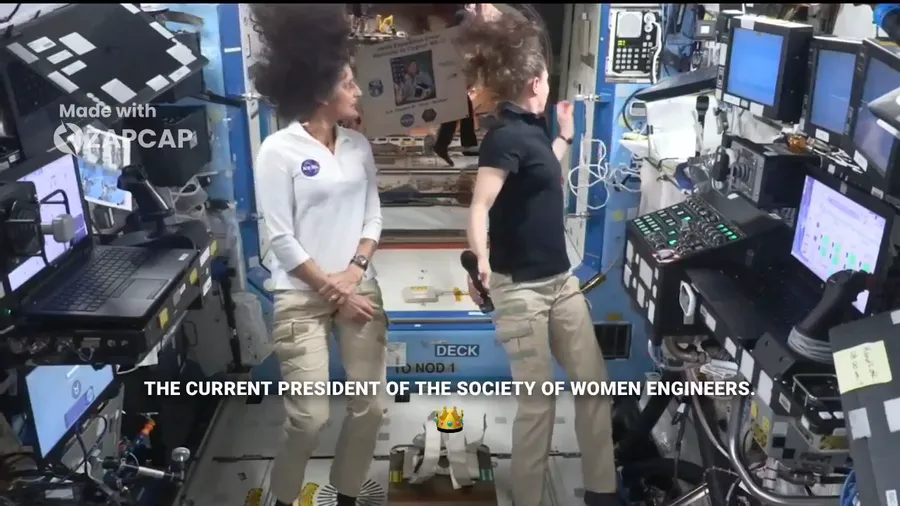
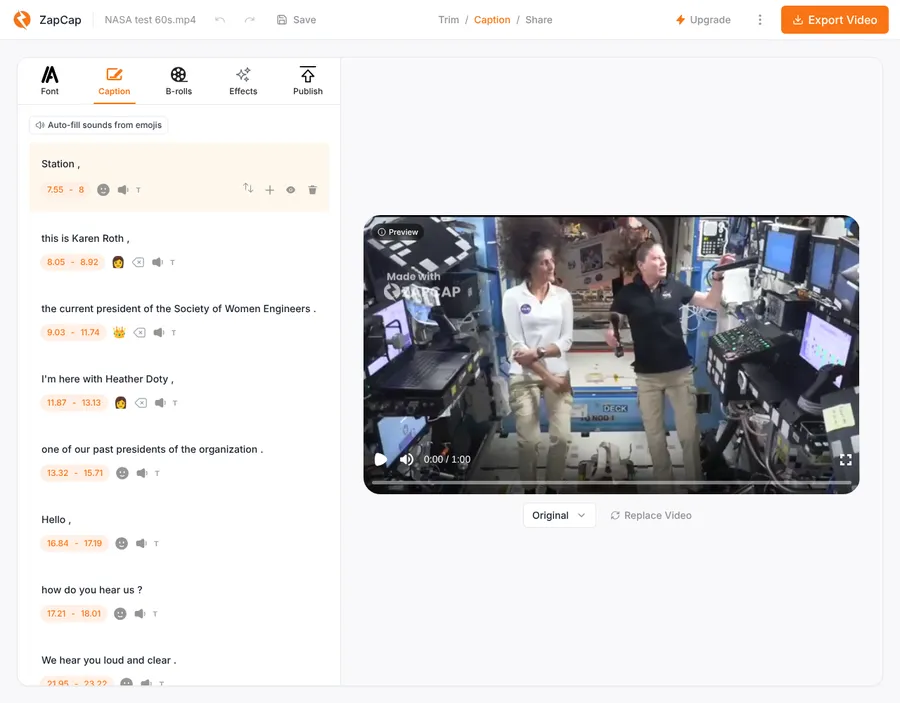
What we did: We made a free ZapCap account with an email and password, uploaded a 60-second clip from a public-domain NASA video (two people on the space station, 1280x720) with English as the language, kept the default Sydney caption theme, exported it, and checked the captions against a hand-checked transcript.
| Account needed | Yes: email and password, then a link in a verification email (arrived in under a minute) |
|---|---|
| Time | About 22 seconds from upload to the caption editor; the export screen estimated 45 seconds |
| Output | MP4, 1280x720 at 30 fps, 60 seconds, captions burned in |
| Watermark | Yes, "Made with ZapCap" in the top left corner |
| Accuracy | 0 of 118 words wrong, including the names Roth, Doty and Suni |
| Caption editor | 23 lines with start and end times; each line can get an emoji or a sound effect |
| Free use | 1 of 3 free projects used |
| Card or payment asked | No |
Full verdict: ZapCap got every word of our clip right and the captions were ready to style within half a minute. The free plan is only good for testing because of the watermark and the 3-videos-a-month limit; Starter at $8/mo billed yearly removes the watermark.
The short version
ZapCap is a web app that adds animated captions to short videos in 50+ languages, with b-roll, silence removal and AI clip tools. The free plan gives 3 videos a month up to 1 minute 30 seconds each, with a "Made with ZapCap" watermark. Paid plans start at $8/mo billed yearly (Starter) and remove the watermark.
Best for: Adding styled, word-by-word captions to a Short or TikTok · Captioning in languages other than English · Creators who want caption templates without learning an editor
Plans and pricing
3 videos a month, up to 1 min 30 s each, no custom templates, ZapCap watermark; no card needed
15 projects a month, 2 min per video, 3 custom templates, no watermark
50 projects a month, 5 min per video, premium templates, faster processing, API access (credits extra)
200 projects a month, 10 min per video, 10 custom templates
What it does well
- All 118 words in our test were right, including the names Roth, Doty and Suni
- Captions ready to edit about 22 seconds after upload
- Dozens of caption themes, plus an emoji or sound effect you can add to each line
- You can edit, delete or change the timing of each caption line
Limitations
- Free exports carry a "Made with ZapCap" watermark in the top left
- Only 3 free videos a month, up to 1 min 30 s each
- Uploads must be MP4 or MOV, at most 1920 pixels wide
- Kept our 16:9 video as 16:9; it did not reframe to vertical
Alternatives to consider



Plans and prices checked on from: zapcap.ai · app.zapcap.ai. Prices change, so confirm on the provider’s site.
Add the ShortStack.tools badge to your site
Paste this on your site to show ZapCap is listed on ShortStack.tools. It links to this page, where creators compare your real prices.
<a href="https://shortstack.tools/tools/zapcap/?ref=badge" target="_blank" rel="noopener"><img src="https://shortstack.tools/badge/featured-light.svg" alt="Featured on ShortStack.tools" width="220" height="56"></a>
<a href="https://shortstack.tools/tools/zapcap/?ref=badge" target="_blank" rel="noopener"><img src="https://shortstack.tools/badge/featured-dark.svg" alt="Featured on ShortStack.tools" width="220" height="56"></a>Need React, Markdown, a website builder or an AI agent prompt? Get every format →
Questions about ZapCap
How much does ZapCap cost?
Paid plans start at $8/mo billed yearly (Starter). Prices change, so confirm on the provider’s site.
Catalog snapshot: . The 'Our hands-on test' section is from our own test; the rest summarizes the provider's published information. Suggest a correction →