
FreeConvert Video Compressor pricing, free plan and alternatives
UtilitiesPricing · checked November 23, 2026
Free
Paid plans from $10.83/mo billed yearly
We tested it on Oct 26, 2026: It cut the 10-minute video from 44.5 MB to 25.0 MB in about 40 seconds with no account or watermark. See the test
Is FreeConvert's video compressor free? Yes. Without an account you get 20 conversion minutes a day, up to 5 conversion minutes per file and files up to 1GB, and the output has no watermark (we compared frames in our test). Paid plans start at $10.83/mo billed yearly ($12.99 monthly) and raise the file cap to 1.5GB, then 2GB, 5GB and up to 20GB. Who it's for: anyone who needs to get a phone clip or screen recording under an upload or email limit without installing software. Not for: files over 1GB on the free plan, footage you don't want uploaded to a third-party server, or big batches. For those, try HandBrake on your computer or our in-browser compressor, which doesn't upload the file.
Online video compressor with codec and target-size options, no watermark, 1GB free limit.
Is FreeConvert Video Compressor free? What the free plan includes
Is FreeConvert Video Compressor free?
Yes, FreeConvert Video Compressor has a free plan. Free plan limits: 20 conversion minutes/day, 5 conversion minutes per file, 1GB max file.
“Free users get 20 conversion minutes per day for both Web and API use.” Source ↗
Quoted from FreeConvert Video Compressor's own pages, captured on . Plans change, so confirm on their site before you pay.
Our latest hands-on test
Verdict
It cut the 10-minute video from 44.5 MB to 25.0 MB in about 40 seconds with no account or watermark.
- Size after (from 44.5 MB)
- 25.0 MB (44% less)
- Time
- About 40 s
- Watermark
- None
- Account needed
- Not needed
Good
- Cut the file by 44%
- Kept 1280x720, 30 fps and length
Watch out
- Uploads your file to its server
- Audio cut to 44 kbps
All test results
What we did: With no account and the default settings, we compressed our 10-minute 1280x720 NASA test video (44.5 MB).
| Size after (from 44.5 MB) | 44.5 MB to 25.0 MB (44% smaller) |
|---|---|
| Time | About 40 seconds, upload and compress |
| Output | 1280x720, 30 fps, 10:00; audio 110 to 44 kbps |
| Watermark | None |
| Account needed | Not needed |
| Free limits | Max file size 1 GB without an account |
Full verdict: It cut the 10-minute video from 44.5 MB to 25.0 MB in about 40 seconds with no account or watermark. The file is uploaded, and audio drops to 44 kbps.
Earlier tests
Earlier test: 60-second phone clip,
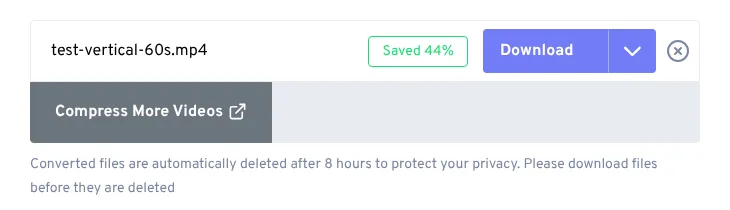
FreeConvert cut our phone clip almost in half in about 21 seconds, with no account, no watermark and the same resolution.
Method and results
What we did: We made a 60-second vertical test clip (1080x1920, 30 fps, H.264, 91.1 MB, like a raw phone export) and ran it through the video compressor in a desktop browser, without an account, using the default settings.
| Account needed | No |
|---|---|
| File size | 91.1 MB to 50.8 MB (saved 44%) on the default settings |
| Time | About 21 seconds to upload and compress |
| Resolution and length | Kept 1080x1920, 30 fps and the full 60 seconds |
| Longer test (26 Oct) | A 10-minute 1280x720 video: 44.5 MB to 25.0 MB (saved 44%) in about 40 seconds, same resolution and length, no watermark |
| Watermark | None: we compared frames from the original and the output |
| Limits we saw | Max file size 1 GB without an account; files deleted after 8 hours |
| Ads | Yes, ad slots on the page |
Full verdict: A quick, free way to shrink a phone video before uploading or sending it. The defaults cut the file almost in half without lowering the resolution. If you need a smaller file, the advanced settings let you pick a target size or switch to H.265.
The short version
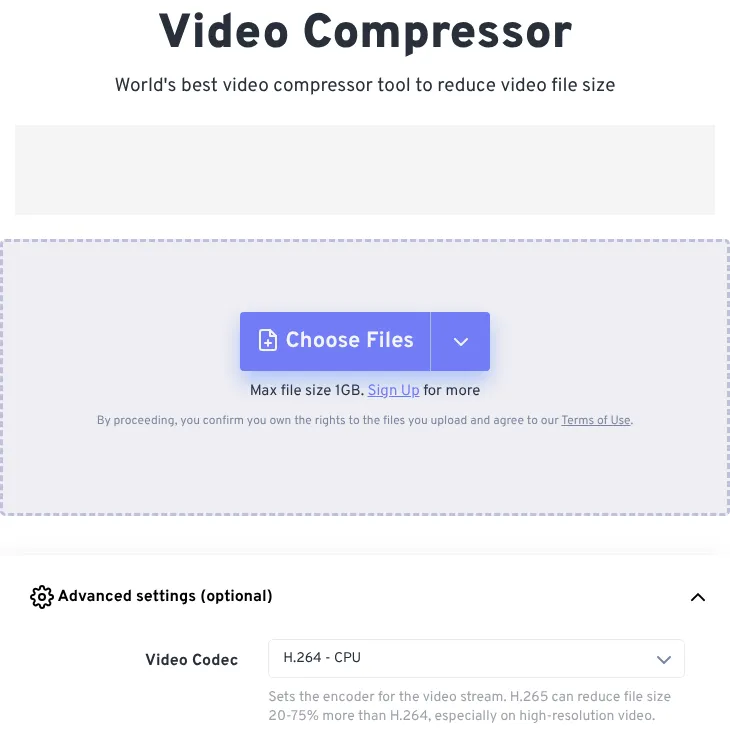
FreeConvert's Video Compressor shrinks MP4, MOV, MKV and other video files in the browser. You pick a codec (H.264 or H.265) and either a target size as a percentage of the original or a target quality. Yes, it is free to use: free users get 20 conversion minutes per day, 5 conversion minutes per file and a 1GB maximum file size. Paid plans raise the file size limit and the daily allowance.
Best for: Getting a video under an upload or email size limit · Quick compression without installing software · Occasional use within the free daily allowance
Plans and pricing
20 conversion minutes per day (Web and API), 5 conversion minutes per file, 1GB max file size on the compressor page, no account needed to start
1,500 conversion minutes/month, 1.5GB max file size, unlimited operations per day, CPU encoding
2,000 conversion minutes/month, 2GB max file size, highest priority
4,000 conversion minutes/month, 5GB max file size, GPU/CPU encoding
Up to 1M conversion minutes/month and up to 20GB files
What it does well
- Free daily allowance (20 conversion minutes) with no sign-up needed on the website
- Target-size mode: set the output as a percentage of the original, for example 25% turns a 100MB file into about 25MB
- Quality mode uses CRF (0 to 51, default 23) when quality matters more than an exact size
- H.265 option, which FreeConvert says can cut size 20-75% more than H.264, especially at 1080p and 4K
- Can also resize the video (for example 4K down to 1080p) or cap the bitrate
- All paid plans remove ads, allow 100 conversions at a time and include web and API use; monthly plans can be canceled after one month
Limitations
- Free files are capped at 1GB and 5 conversion minutes each, so long or 4K clips may not fit
- Uploads go to FreeConvert's servers, so it is slower than a desktop tool for big files and not ideal for private footage
- Large files and H.265 use more conversion minutes per file, so the 20 free minutes a day can cover fewer than 20 videos
- One-time credit top-ups expire 30 days after purchase
Alternatives to consider


Plans and prices checked on from: freeconvert.com · freeconvert.com. Prices change, so confirm on the provider’s site.
Add the ShortStack.tools badge to your site
Paste this on your site to show FreeConvert Video Compressor is listed on ShortStack.tools. It links to this page, where creators compare your real prices.

<a href="https://shortstack.tools/tools/freeconvert-video-compressor/?ref=badge" target="_blank" rel="noopener"><img src="https://shortstack.tools/badge/featured-light.svg" alt="Featured on ShortStack.tools" width="220" height="56"></a>
<a href="https://shortstack.tools/tools/freeconvert-video-compressor/?ref=badge" target="_blank" rel="noopener"><img src="https://shortstack.tools/badge/featured-dark.svg" alt="Featured on ShortStack.tools" width="220" height="56"></a>Need React, Markdown, a website builder or an AI agent prompt? Get every format →
Questions about FreeConvert Video Compressor
Is FreeConvert Video Compressor free?
Yes. The free plan gives 20 conversion minutes a day, up to 5 minutes per file and files up to 1GB. Paid plans start at $10.83/mo billed yearly ($12.99 monthly) for more minutes and bigger files.
What are the best FreeConvert alternatives?
HandBrake and Shutter Encoder are free desktop apps with no daily limits. See the alternatives below.
Does FreeConvert add a watermark?
No. FreeConvert's compressor exports videos without a watermark, even on the free plan.
How do I compress a video with FreeConvert?
Click Choose Files, keep the default options or change them under Advanced settings, click Compress Now!, then click Download when the status says Done. In our two tests the default settings made the file 44% smaller and kept the resolution.
Is FreeConvert safe to use?
FreeConvert says it uses SSL/TLS encryption and secure data centers. Your video is uploaded to its servers, though, so for private footage a desktop app like HandBrake keeps the file on your computer.
What video formats does FreeConvert support?
MP4, MOV, MKV, AVI, FLV, MTS, M2TS, 3GPP, MXF and more. You can choose H.264 for the widest compatibility or H.265 for smaller files.
Why is my video too big for FreeConvert's free plan?
Free files are capped at 1GB and 5 conversion minutes each. For bigger or longer videos, use a paid plan (from $10.83/mo billed yearly, $12.99 monthly) or a free desktop app such as HandBrake or Shutter Encoder.
How much is FreeConvert per year?
Yearly billing gives 2 months free: Basic is $10.83 a month paid annually ($12.99 monthly), Standard $20.82 ($24.99 monthly) and Pro $24.99 ($29.99 monthly). Paid plans have no ads and a money-back guarantee.
How much does FreeConvert compress a video?
On the default settings, our 91.1 MB phone clip came out at 50.8 MB and a 44.5 MB 10-minute video at 25.0 MB, both 44% smaller with the same resolution and frame rate. For a smaller file, set a lower target percentage or switch to H.265.
Can I compress a video over 1GB with FreeConvert?
Not on the free plan, which caps files at 1GB. Basic allows 1.5GB, Standard 2GB, Pro 5GB and Scale up to 20GB. A desktop app such as HandBrake has no file size cap.
What is a conversion minute on FreeConvert?
FreeConvert counts how long your file takes to process on its servers. Most photo and document jobs take about a minute, while large files or advanced codecs use more. Failed jobs are refunded automatically.
How much does FreeConvert Video Compressor cost?
Paid plans start at $10.83/mo billed yearly (Basic). Prices change, so confirm on the provider’s site.
Catalog snapshot: . The 'Our hands-on test' section is from our own test; the rest summarizes the provider's published information. Suggest a correction →