HandBrake pricing, free plan and alternatives
UtilitiesPricing · checked October 27, 2026
Free
Free (open source)
We tested it on Oct 27, 2026: HandBrake worked with one preset and no setup, but on an already web-compressed video it made the file almost twice as big. See the test
Free open-source video transcoder for compressing and converting video with presets.
Is HandBrake free? What the free plan includes
Is HandBrake free?
Yes, HandBrake has a free plan.
“Everyone can use HandBrake to make videos for free.” Source ↗
Quoted from HandBrake's own pages, captured on . Plans change, so confirm on their site before you pay.
Our hands-on test
Verdict
HandBrake worked with one preset and no setup, but on an already web-compressed video it made the file almost twice as big.
- Time to result
- 3 min 51 s for 10 min
- File size
- 44.5 MB to 83.7 MB
- Watermark
- None
- Account needed
- Not needed
Good
- No account, payment or watermark
- Kept 30 fps and the full length
- No visible picture change in our frames
Watch out
- File grew 88% with the Fast 1080p30 preset
- Pick a lower-quality preset for smaller files
All test results
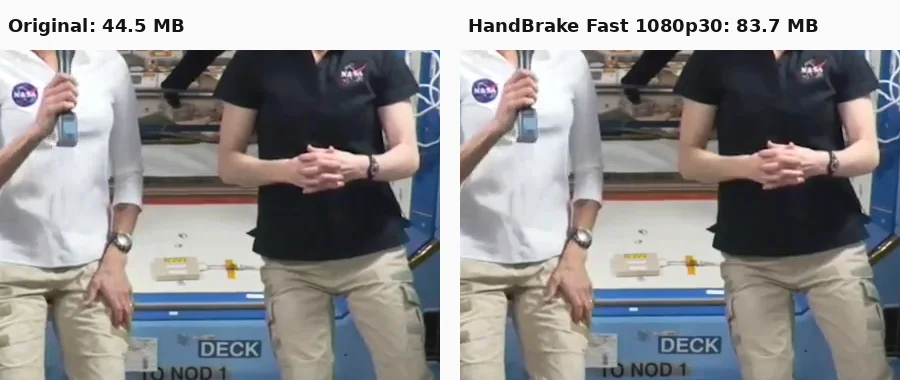
What we did: We installed HandBrake's command-line version (HandBrakeCLI 1.7.2 from Ubuntu's package list; the website offers 1.11.2) on a 4-core Linux server with no graphics chip, and compressed a 10-minute public-domain NASA video (1280x720, 30 fps, H.264) with the "Fast 1080p30" preset and no other settings.
| Account or payment | None |
|---|---|
| Time | 3 minutes 51 seconds for the 10-minute video (about 78 frames a second) |
| File size before | 44.5 MB (video at about 475 kbps) |
| File size after | 83.7 MB (video about 976 kbps), 88% bigger |
| Resolution | 1280x716: kept at 720p, not enlarged to 1080p; 4 rows of black at the top were cropped automatically |
| Frame rate and length | 30 fps, 10:00, same as the original |
| Watermark | None |
| Picture | No visible difference from the original in our side-by-side frames |
Full verdict: HandBrake worked with one preset and no setup, but on a video that was already compressed for the web it made the file almost twice as big. It suits large files straight from a camera or phone better. To make a small file smaller, choose a lower-quality preset or set a smaller target size, instead of using Fast 1080p30.
The short version
HandBrake is a free, open-source video converter for Windows, Mac and Linux. You pick a preset, such as "Fast 1080p30", and it re-encodes the video, which can shrink big camera files before you upload or edit them. There are no paid plans, accounts or watermarks.
Best for: Shrinking large phone or camera recordings before upload · Converting odd formats into a standard MP4 · Batch converting many files with the same settings
Plans and pricing
Open source, no account, no watermark; desktop app plus a command-line version (HandBrakeCLI)
What it does well
- Free and open source, with no account or watermark
- Ready-made presets; "Fast 1080p30" needs no other settings
- Never enlarged our 720p video to 1080p, and trimmed 4 rows of black at the top
- Runs on Windows, Mac and Linux, with a command-line version for batches
Limitations
- On an already-compressed web video, the Fast 1080p30 preset made the file 88% bigger
- Many settings for a beginner; the preset name doesn't tell you the file size you'll get
- Re-encoding takes time on long videos (about 4 minutes for 10 minutes of 720p on our 4-core server)
- Linux package managers can carry an older version than the website
Alternatives to consider


Plans and prices checked on from: handbrake.fr · handbrake.fr. Prices change, so confirm on the provider’s site.
Add the ShortStack.tools badge to your site
Paste this on your site to show HandBrake is listed on ShortStack.tools. It links to this page, where creators compare your real prices.

<a href="https://shortstack.tools/tools/handbrake/?ref=badge" target="_blank" rel="noopener"><img src="https://shortstack.tools/badge/featured-light.svg" alt="Featured on ShortStack.tools" width="220" height="56"></a>
<a href="https://shortstack.tools/tools/handbrake/?ref=badge" target="_blank" rel="noopener"><img src="https://shortstack.tools/badge/featured-dark.svg" alt="Featured on ShortStack.tools" width="220" height="56"></a>Need React, Markdown, a website builder or an AI agent prompt? Get every format →
Questions about HandBrake
How much does HandBrake cost?
HandBrake has no paid plan listed. Prices change, so confirm on the provider’s site.
Catalog snapshot: . The 'Our hands-on test' section is from our own test; the rest summarizes the provider's published information. Suggest a correction →