
Subclip pricing, free plan and alternatives
AI clippingPricing · checked October 28, 2026
$24.99/mo
Billed yearly
We tested it on Nov 15, 2026: Subclip captioned our clip in its browser tool with no account, with 7 of 118 words wrong, but exporting needs a sign-in and, in our Oct 28 test, a paid plan. See the test
AI tool that converts long YouTube videos into captioned short clips.
Is Subclip free? What the free plan includes
Does Subclip have a watermark?
Yes, free exports are watermarked.
“Export watermark-free on paid plans” Source ↗
Quoted from Subclip's own pages, captured on . Plans change, so confirm on their site before you pay.
Our hands-on test
Verdict
Subclip captioned our clip in its browser tool with no account, with 7 of 118 words wrong, but exporting needs a sign-in and, in our Oct 28 test, a paid plan.
- Free plan
- Captions and preview only
- Time to captions
- About 50 s
- Preview
- "Subclip.app" watermark
- Account needed
- To export
Good
- Captions and a styled preview with no account
- Each caption line can be edited or restyled
Watch out
- 7 of 118 words wrong (5.9%), including all three names
- Export asks you to sign in; on Oct 28 a free account was sent to an upgrade screen
All test results
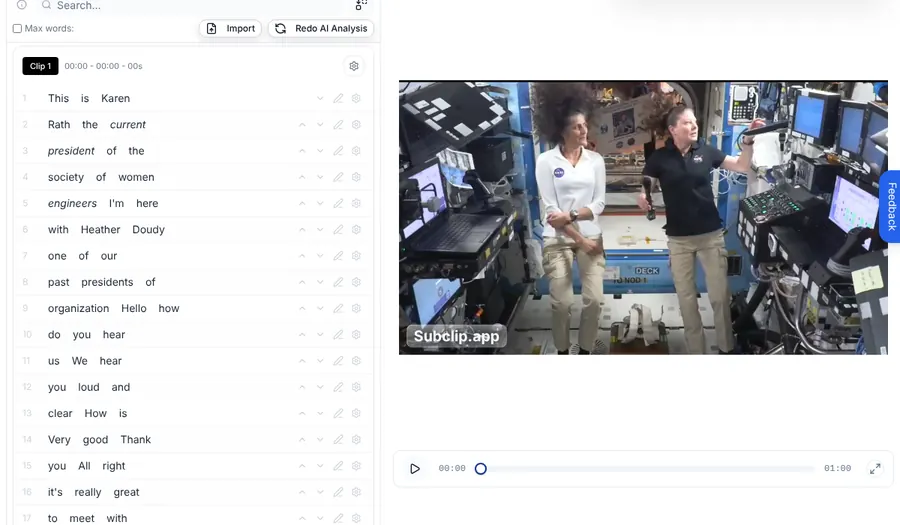
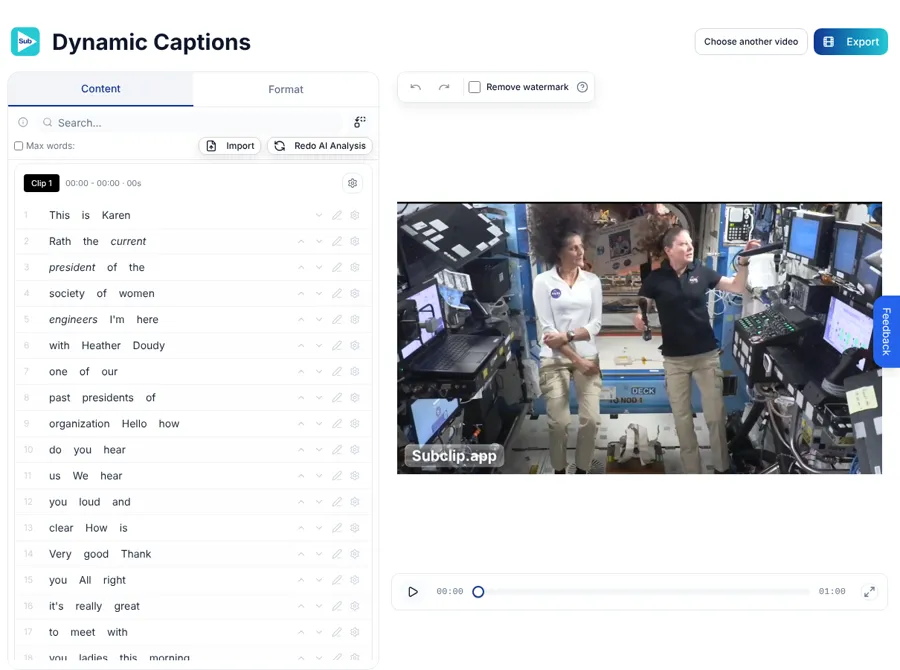
What we did: In headless Chromium with no account, we opened Subclip's Add Subtitles tool, uploaded a 60-second clip from a public-domain NASA video (two people on the space station, 1280x720, 30 fps, about 6 seconds of silence at the start), kept English and the default Storyteller style, clicked Add Captions, read every caption line in the editor against our hand-checked 118-word transcript, and clicked Export. Filler sounds (uh, um) and the cut-off first word of the next answer in the last half second ("Wow") are not counted either way.
| Account needed | Not to caption and preview; Export opens a sign-in box (Google or email) |
|---|---|
| Time | About 48 to 50 seconds from Add Captions to the caption editor (two runs) |
| Accuracy | 7 of 118 words wrong (5.9%): left out "Station" and "the" before organization, and wrote "Rath" for Roth, "Doudy" for Doty, "How is" for "how us", "soon" for Suni and "this space program" for "the space program" |
| Caption editor | 39 short lines of 2 to 5 words, each with edit and style buttons |
| Watermark | Yes, "Subclip.app" on the preview, with a Remove watermark checkbox |
| Export | Asks you to sign in. In our Oct 28 test, a free account got an "Upgrade required" screen |
| Earlier test | On Oct 28 we counted 6.8% (8 of 118) on the same clip |
| Card or payment asked | No |
Full verdict: Subclip's browser tool captions a clip without an account, and the line-by-line editor makes fixes easy. It got all three names wrong in our clip, and you can't export without signing in; on our Oct 28 free account, export needed a paid plan.
The short version
Subclip is an AI video editor for Mac and Windows that edits from plain-language requests and works with ChatGPT, Claude, Cursor and Codex through MCP. Its website also has browser tools such as Dynamic Captions and video dubbing. You can preview captions for free, but exporting needs a paid plan, which starts at $24.99/mo billed yearly or $29.99 monthly.
Best for: Creators who want to edit videos by typing requests to an AI assistant · Adding styled word-by-word captions to Shorts and Reels · People who already use Claude, Cursor or Codex and want them to edit video
Plans and pricing
Caption preview in the browser with a Subclip.app watermark; exporting asks you to upgrade
600 credits a month, 10 GB storage, AI editor, MCP server, AI video, avatar, voice and music tools
1,050 credits a month, 15 GB storage
2,000 credits a month, 25 GB storage
What it does well
- Captions were ready about 45 seconds after we clicked Add Captions
- 110 of 118 words right in our test (6.8% word error rate)
- No account needed to upload and preview captions
- Each caption line can be edited, and there are several caption styles
Limitations
- Export needs a paid plan, so the free tier is only a preview
- Got the names Roth, Doty and Suni wrong (Rath, Doudy, soon)
- Preview carries a Subclip.app watermark
- Screen recording and live streaming with auto zoom are Mac only
Alternatives to consider



Plans and prices checked on from: subclip.app · subclip.app · subclip.app. Prices change, so confirm on the provider’s site.
Add the ShortStack.tools badge to your site
Paste this on your site to show Subclip is listed on ShortStack.tools. It links to this page, where creators compare your real prices.

<a href="https://shortstack.tools/tools/subclip/?ref=badge" target="_blank" rel="noopener"><img src="https://shortstack.tools/badge/featured-light.svg" alt="Featured on ShortStack.tools" width="220" height="56"></a>
<a href="https://shortstack.tools/tools/subclip/?ref=badge" target="_blank" rel="noopener"><img src="https://shortstack.tools/badge/featured-dark.svg" alt="Featured on ShortStack.tools" width="220" height="56"></a>Need React, Markdown, a website builder or an AI agent prompt? Get every format →
Questions about Subclip
Is Subclip free?
No, Subclip doesn’t list a free plan. Paid plans start at $24.99/mo billed yearly (Creator). Prices change, so confirm on the provider’s site.
How much does Subclip cost?
Paid plans start at $24.99/mo billed yearly (Creator). Prices change, so confirm on the provider’s site.
Catalog snapshot: . The 'Our hands-on test' section is from our own test; the rest summarizes the provider's published information. Suggest a correction →